Compatibility guide
Why Does Fancy Text Show as Squares?
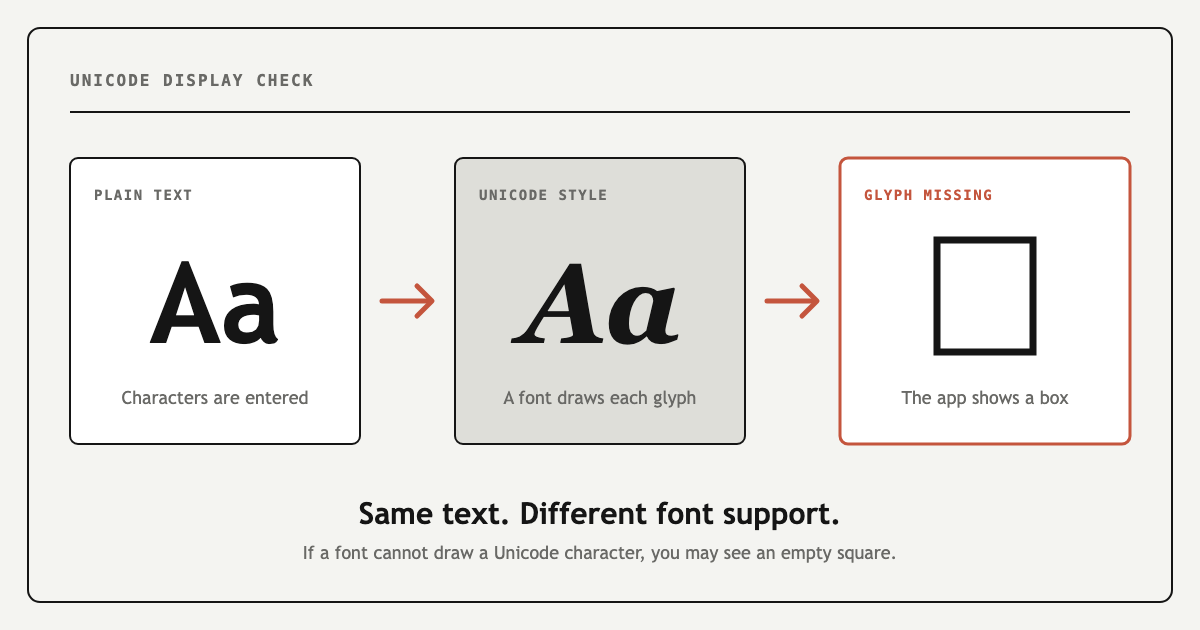
Fancy text shows as squares when a device or app cannot draw one or more of the Unicode characters you pasted. The text may still be intact, but the available font has no matching glyph. Try another style, test the text in a different app, or use plain letters for essential information.
What do the square and replacement symbols mean?
Fancy text generators do not install a new font. They replace ordinary letters with separate Unicode characters that already resemble bold, italic, script, circled or boxed letters. To display one of those characters, the operating system and app need access to a font containing a matching visual shape, called a glyph.
Not every broken-looking symbol means the same thing. These three results point to different problems:
Empty square or box
The current font cannot draw the character. This missing-glyph placeholder is often called tofu.
Replacement character
The text may have been decoded incorrectly or damaged during an encoding conversion.
Plain, missing or rejected text
The app may normalize, remove or block decorative characters instead of showing a box.
Why can the same text work on one device but not another?
The copied characters remain the same, but every device chooses its own fonts to render them. A current iPhone, Android phone and Windows computer may therefore display the same string differently. Older systems usually have less complete Unicode coverage, while an individual app may use a limited custom font instead of the broader system fallback fonts.
This is why text can look correct in your browser but turn into boxes after you paste it into a profile, game or messaging app. It can also work for you while another person sees missing symbols on their device.
How to fix fancy text showing as boxes
| What you see | Likely cause | What to try |
|---|---|---|
| One letter is a square | The font lacks that particular glyph. | Replace the letter or choose another style. |
| A whole style becomes boxes | The device does not support that Unicode range. | Use a simpler bold, italic or script style. |
| Boxes appear in only one app | The app uses a limited font or fallback system. | Update the app and test the same text elsewhere. |
| Text disappears or is rejected | The app filters or normalizes decorative Unicode. | Use plain text or a less decorative style. |
| You see � instead of □ | The character may have been decoded incorrectly. | Copy the original text again instead of the broken version. |
| A new emoji appears as a box | The operating system predates that emoji sequence. | Update the system or use an older emoji. |
| Accents stay plain | No matching styled Unicode character exists. | Keep the original letter; it is not a display error. |
Which fancy text styles should you try?
No fancy font style is guaranteed to work everywhere. If decorative text shows as squares, start with a simple style and test it in the final app. These common options are useful first choices:
- Bold𝐅𝐚𝐧𝐜𝐲
- Sans Bold𝗙𝗮𝗻𝗰𝘆
- Italic𝐹𝑎𝑛𝑐𝑦
- Monospace𝙵𝚊𝚗𝚌𝚢
Enclosed letters such as 🄵🄰🄽🄲🅈, squared styles and effects made with combining marks may be less predictable in limited fonts or text fields. If meaning matters more than decoration, ordinary Fancy is the safest fallback.
Why is fancy text not working on Instagram, TikTok or Discord?
A style can display correctly in the Fontsby preview and still fail after you paste it into Instagram, TikTok, Discord, a game or another app. The destination controls its own fonts and character rules. It may show a missing-glyph box, remove a character, reject a username or shorten the text.
Paste the result into the exact field you plan to use. Bios, display names, usernames and messages can have different rules even inside the same platform. If one style fails, try a simpler version instead of repeatedly copying the broken text.
How to test fancy text before posting
- Copy the style and paste it into the exact app and field where you plan to use it.
- If you see boxes, paste the same text into a browser or notes app to identify whether the problem belongs to one app.
- Check it on another device or ask someone else to preview it.
- Confirm that every important letter, number and punctuation mark is readable.
- If a character becomes a box, return to the generator and select a simpler alternative.
A style can display correctly and still be difficult for assistive technology. Read the fancy fonts accessibility guide before using styled Unicode for important information.
Frequently asked questions
Is the square part of my copied text?
Usually not. It is a placeholder drawn by the current font. The underlying Unicode character may display correctly somewhere else.
Can a generator guarantee compatibility?
No. The receiving device, operating system, browser and app ultimately decide how a character is rendered.
Why did only some letters change?
Unicode does not provide a styled equivalent for every letter, accent, number or punctuation mark. A generator may preserve unsupported characters as ordinary text instead of removing them.
Will updating my phone fix the boxes?
It can help when a newer system font contains the missing glyph. It will not fix an app that blocks the character or deliberately uses a limited font.
Why does fancy text work on my phone but not for someone else?
Each device has its own operating system, fonts and fallback rules. The same Unicode characters can therefore display correctly for one person and as empty boxes for another.